Introduction
Dozens of AI research tools now exist. Choosing between them is overwhelming.
This comparison covers the leading platforms: their strengths, limitations, and best use cases.
Evaluation Criteria
We assessed each tool across six dimensions:
Functionality: Literature search, document analysis, citation manager integration, collaboration features, export options.
AI Capabilities: NLP quality, question-answering accuracy, synthesis, cross-document analysis, bias detection.
User Experience: Interface design, learning curve, mobile access, speed, customer support.
Privacy and Security: Encryption, data policies, compliance certifications, on-premises options.
Pricing: Free tier value, subscription costs, educational discounts, cost per research hour.
Integration: Citation manager compatibility, reference database connections, writing tool integration, APIs, automation.
Leading AI Research Tools
Fynman Research Assistant
Strengths
Fynman’s privacy-first architecture includes local processing options so your data can stay on your device. The cross-document analysis is sophisticated, finding patterns across multiple papers efficiently. It integrates strongly with academic databases where you already search. Literature synthesis capabilities are comprehensive, handling complex synthesis tasks. The AI reasoning is transparent with clear source attribution so you see exactly where insights come from.
Ideal for
Fynman works best for researchers who prioritize data privacy, particularly those handling sensitive materials. Teams needing robust collaboration features find value in the teamwork tools. Organizations with strict data governance requirements appreciate the local processing option.
Pricing
A free tier is available to try the basics. Pro plans start at $29 per month with educational discounts available for students and academics.
Semantic Scholar Research Feed
Strengths
Semantic Scholar has a massive corpus of over 200 million academic papers. Its paper recommendation engine is excellent at finding relevant work. Citation analysis features are strong for understanding research networks. Core features remain free. Developers get API access to build on the platform.
Limitations
Document annotation capabilities are limited. Synthesis features are basic compared to dedicated synthesis platforms. Collaboration tools for team workflows don’t exist.
Ideal for
Semantic Scholar works best for researchers focused on discovery and citation analysis rather than deep document analysis. If you need to find papers and understand how they cite each other, Semantic Scholar excels.
Elicit Research Assistant
Strengths
Elicit’s question-based interface is intuitive. It excels at extracting specific data points from papers. It’s particularly helpful for systematic review workflows that demand structured data. Evidence tables are presented clearly. Database coverage continues growing.
Limitations
It’s limited to specific question types you can ask. Advanced features require a subscription. Open-ended exploration is less effective than with other tools.
Ideal for
Elicit shines for researchers conducting systematic reviews or meta-analyses with specific research questions that you can articulate upfront.
Consensus Academic Search
Strengths
Consensus provides direct answers to research questions rather than requiring you to synthesize papers yourself. Evidence quality scoring helps you trust the synthesized answer. Synthesis of multiple papers is solid. The interface is user-friendly. A mobile app lets you access findings on the go.
Limitations
Customization options are limited. The corpus is smaller than major platforms like Semantic Scholar. Export capabilities are basic.
Ideal for
Consensus works well for researchers seeking quick answers to specific questions when you don’t need deep analysis of individual papers.
ResearchRabbit Discovery
Strengths
ResearchRabbit’s visual paper exploration interface makes discovering connections intuitive. It’s excellent for finding related work that you hadn’t known existed. Social features let you follow researchers in your field. Core features stay free. Mobile experience is good.
Limitations
It focuses primarily on discovery rather than deep analysis. Document processing capabilities are limited. Advanced synthesis features don’t exist.
Ideal for
ResearchRabbit excels for early-stage research and literature discovery, particularly if you’re a visual learner who thinks best with diagrams and networks.
Feature Comparison Matrix
| Feature | Fynman | Semantic Scholar | Elicit | Consensus | ResearchRabbit |
|---|---|---|---|---|---|
| Document Analysis | ⭐⭐⭐⭐⭐ | ⭐⭐⭐ | ⭐⭐⭐⭐ | ⭐⭐⭐ | ⭐⭐ |
| Literature Discovery | ⭐⭐⭐⭐ | ⭐⭐⭐⭐⭐ | ⭐⭐⭐ | ⭐⭐⭐⭐ | ⭐⭐⭐⭐⭐ |
| Synthesis Quality | ⭐⭐⭐⭐⭐ | ⭐⭐ | ⭐⭐⭐⭐ | ⭐⭐⭐⭐ | ⭐ |
| Privacy Controls | ⭐⭐⭐⭐⭐ | ⭐⭐⭐ | ⭐⭐⭐ | ⭐⭐⭐ | ⭐⭐⭐ |
| Collaboration | ⭐⭐⭐⭐⭐ | ⭐⭐ | ⭐⭐ | ⭐⭐ | ⭐⭐⭐ |
| Free Tier Value | ⭐⭐⭐⭐ | ⭐⭐⭐⭐⭐ | ⭐⭐ | ⭐⭐⭐ | ⭐⭐⭐⭐ |

Use Case Scenarios
Graduate Student Literature Review
Challenge: Comprehensive review for thesis introduction chapter
Recommended approach:
- Start with ResearchRabbit for initial discovery
- Use Semantic Scholar for citation analysis
- Process key papers with Fynman for deep analysis
- Export findings to writing tools
Systematic Review Research
Challenge: Meta-analysis requiring structured data extraction
Recommended approach:
- Use Elicit for structured question answering
- Supplement with Fynman for synthesis
- Verify findings with Consensus for consensus checking
- Document methodology for reproducibility
Interdisciplinary Research
Challenge: Exploring connections across multiple fields
Recommended approach:
- Begin with broad searches in Semantic Scholar
- Use Fynman’s cross-document analysis for synthesis
- Leverage ResearchRabbit for visual exploration
- Validate insights with domain experts
Industry Research Collaboration
Challenge: Sensitive data requiring privacy controls
Recommended approach:
- Use Fynman with on-premises deployment
- Implement secure collaboration workflows
- Regular privacy audits and compliance checks
- Staff training on data handling protocols
Making Your Decision
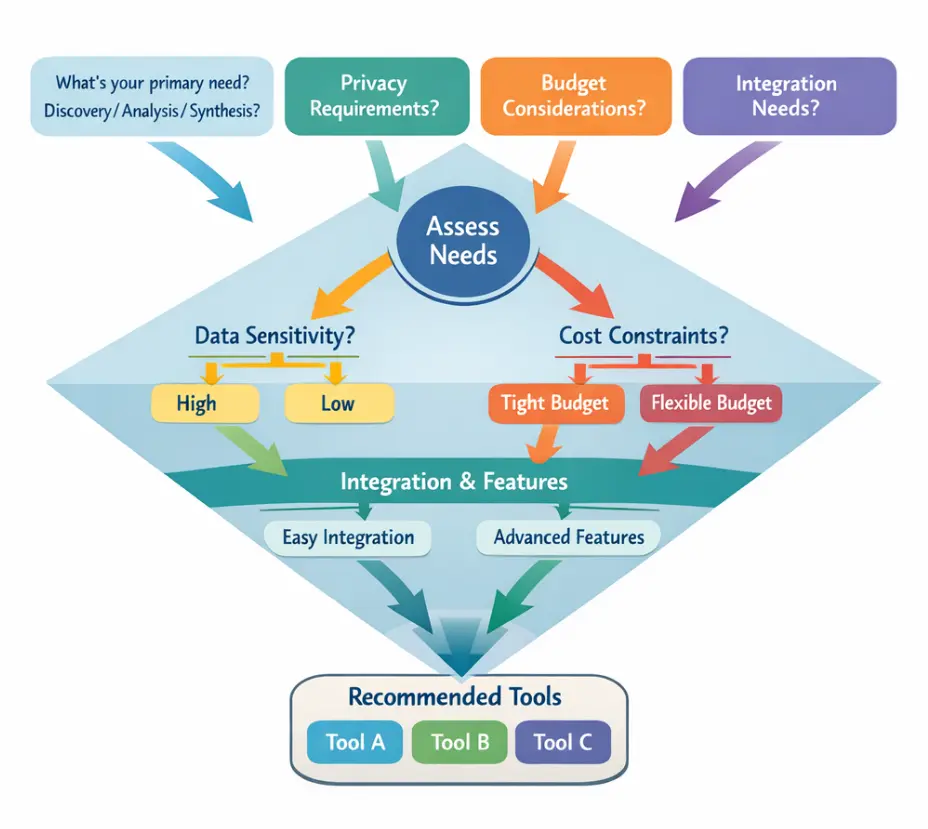
Assessment Framework
Red Flags to Avoid
Avoid tools without clear data usage policies that don’t explain what happens to your information. Skip platforms requiring exclusive content uploads that lock you in. Be wary of services with no academic credentials or citations—peer-reviewed research validates quality. Tools that don’t provide source attribution hide where their answers came from. Platforms with poor customer support reputation leave you stuck when problems arise.
Future Trends
Emerging: Multimodal analysis (figures, tables, charts). Real-time collaboration. Predictive research. Automated methodology.
Institutional adoption: Universities are negotiating enterprise agreements for institution-wide licenses, enhanced privacy, usage analytics, library integration, and staff training.
Conclusion
Choosing depends on your needs, privacy requirements, and methodology. No tool excels everywhere, but understanding strengths helps you build an effective toolkit.
Start with clear objectives, try multiple options, stay adaptable. Remember: tools augment critical thinking, they don’t replace it.
The researchers who leverage these tools effectively while maintaining rigor will have real advantages in their work.